 Image to Text
Extract text from an image
without uploading it anywhere.
Press AltShiftS, drag a box over any part of your screen, and the text is on your clipboard. Screenshotted tables come out as a spreadsheet, not a paragraph.
Add to Chrome — free See it read an image
- Runs on your device, offline
- No account, no upload
- Tables to Excel and Sheets
Live Run the actual model, before installing anything
This page can load the same recognition model the extension ships with and run it in your browser on an image you drop in. Your image is not sent to a server — that is the whole point of the product, so you should be able to check it.
Drop an image here, paste a screenshot with CtrlV, or .
The model is about 6 MB and loads only when you start the demo.
How Three ways to capture, all the same shortcut away
Drag a box
Anywhere on any page: charts, dashboards, an embedded PDF, a paused video frame. What you frame is what gets read.
Right-click an image
Straight from the context menu — useful for screenshots people paste into chat, and for images that block selection.
Paste a screenshot
Took a system screenshot? Open the extension and press CtrlV, or drop the file in.
Tables The part other OCR tools get wrong
Most extensions hand you a wall of words and let you rebuild the columns by hand.
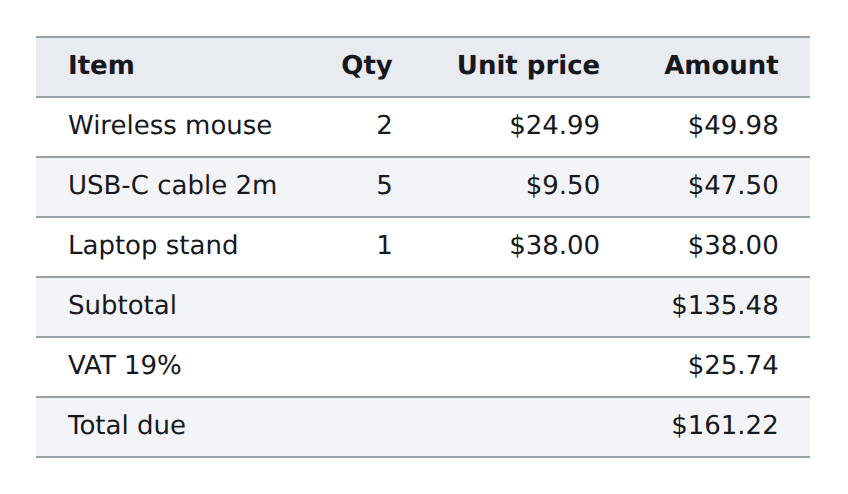
This one reconstructs rows and columns from where the text actually sits, so a screenshotted table
pastes into Excel or Google Sheets with its structure intact — or downloads as .xlsx.
| Item | Qty | Unit price | Amount |
| Wireless mouse | 2 | $24.99 | $49.98 |
| USB-C cable 2m | 5 | $9.50 | $47.50 |
| Laptop stand | 1 | $38.00 | $38.00 |
| Total due | $161.22 |
Privacy There is no server to trust
The model file sits inside the extension package. Recognition happens in your browser, on your machine, with no network call — you can verify it by turning off your connection and capturing anyway. The extension asks for no host permissions, keeps no history, and has no account to sign into.
FAQ Questions people actually ask
How do I extract text from an image?
Right-click it and choose Extract text from image, or press AltShiftS and drag a box over it. The text lands on your clipboard.
Can it convert a screenshot of a table to Excel?
Yes — switch on table mode and capture. Paste into Excel or Google Sheets, or download an .xlsx.
Rows and columns are rebuilt from the position of the recognized text.
Does it work offline?
Yes. After installing, no network is needed. Language packs are the only thing downloaded, and only once.
Which languages does it read?
English, Chinese, Japanese and 40+ Latin-script languages are built in. Cyrillic, Korean, Arabic, Greek, Devanagari and Thai install as one-click packs.
Is my screenshot uploaded for recognition?
No. There is no backend. That is also why there is no usage limit and no paywall on the core feature.
What about handwriting or rotated photos?
Printed text is what it is built for. Slightly skewed photos still read; heavily rotated ones do not yet — straighten the image first.
Add it and capture something in the next ten seconds
Works in Chrome, Edge and Brave. No account. No upload.